


Simple Fax-Send Fax from Phone
4.67.68K Reviews
App Specs
- Version
- 5.7.1
- Updated On
- License
- Free
- Downloads
- 500,000+
- Developer
- Easy inc.
- Categories
- Business
- Platform
- Android
Screenshots
 Analysis by AppCompare
When a form, signed page, or receipt has to reach a fax number, the awkward part is often finding a machine rather than preparing the paperwork. A phone-based fax app can save that trip, but it also puts document handling on a personal device, so convenience is only part of the decision. Simple Fax-Send Fax from Phone is aimed at that specific chore: getting a document from your phone to a fax recipient without building a larger office workflow around it.
That narrow purpose is useful for people who fax only now and then, such as someone dealing with a one-off form or a small business owner away from the office. It is less compelling if faxing is a daily operation and you need a shared queue, a formal records process, or predictable high-volume costs. I would treat it as a practical tool for occasional sending, while taking a careful moment before putting sensitive paperwork into any mobile service.
Trust starts with the job the app is meant to do
This is a business app from Easy inc., but its appeal is not that it turns a phone into a complete office. It focuses on moving documents through fax, a task that can still crop up in healthcare administration, property paperwork, legal forms, and small organizations that have not switched every process to email. Its 4.6 average from around 21,000 ratings and more than 500,000 installs suggest that many people have found the use case relevant, though popularity alone is not a reason to send a document without checking the recipient and the contents.
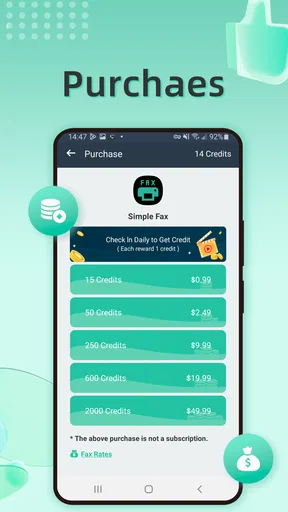
The app is free to install and rated for Everyone. Its current version is 5.6.9, and it runs on Android 7.0 or later. In-app purchases range from $0.99 to $149.99 per item, so I would not assume that a free download means every fax is free. That distinction matters most when a deadline is close: check the credit or purchase prompt before you begin a multi-page job, rather than discovering a payment step after scanning everything.
What to check before a document leaves your phone
A fax often contains more than the page you intend to send. A photo may include a table edge, another sheet, or a handwritten note in the background; a PDF can include extra pages that are easy to overlook on a small screen. I recommend reviewing each page at full enough size to read names, dates, and account details, then confirming the recipient number from a reliable source. A correctly formatted fax sent to the wrong number is still a serious mistake.
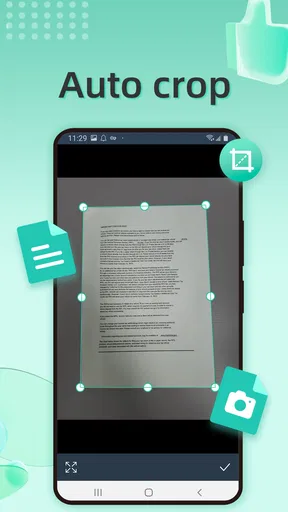
For a paper original, take the photo on a flat, uncluttered surface and use even light. Cropping can make the page easier to read, but it can also cut off a signature or a line printed close to the edge. Before sending, compare the preview with the physical page and count the pages. This little pause is especially worthwhile for forms where a missing reverse side or attachment can delay the whole process.
There is a useful trade-off between using a photo and selecting an existing file. A photo is convenient when the document is in your hand and you need to act immediately; an existing PDF is usually easier to inspect and less likely to include shadows or skew. If the document has several pages, a prepared file can also make it simpler to verify order before transmission. I would choose the source that makes the final preview easiest to check, not simply the one that takes the fewest taps.
Worth Reading Before You Choose

EA SPORTS FC Mobile 26 Is a Bigger Football Game, but It Takes Time

Flipboard Shows What News Apps Must Do Beyond the Feed

Switching to Android Auto Means Rethinking Your Driving Routine

Google Calendar Makes a Crowded Week Easier to Manage

Ludo King Makes the Most of the Minutes Between Plans

Baby Panda World Brings Quick Play to Modern Phones, but Its Game Library Feels Busy
Choosing the right workflow for occasional faxing
Compared with visiting a copy shop or office that offers fax service, a phone app avoids travel and lets you prepare the document where you are. Compared with email, it fits situations where the other party specifically requires a fax number, but it does not make fax the better choice when a secure portal or an approved electronic submission method is available. If a recipient offers several options, I would first use the channel they recommend for that kind of document; fax is most useful when it is actually required or accepted.
For a simple one-page task, the most efficient routine is to gather the complete paperwork first, scan or select it, inspect the preview, and only then enter the destination and proceed to the purchase step if one appears. For recurring work, keep a separate note of the recipient’s correct fax number and any cover-sheet instructions, rather than relying on memory or a contact entry that may be out of date. These habits reduce avoidable retries, which matter when each send can involve credits.
Who is likely to benefit, and who may prefer another option
I can see this fitting a freelancer sending an occasional signed page, a family member handling paperwork for someone else, or a small business that needs a quick way to send a document while away from its usual equipment. It is particularly handy when the alternative is interrupting the day to find a physical fax machine. Someone who sends large batches, needs several staff members to review outgoing documents, or must keep a tightly controlled audit trail should compare it with a dedicated business fax service or an organization-approved system instead.
It is also not the right shortcut for every sensitive document. Before sending medical, financial, identity, or legal paperwork, consider whether the recipient’s preferred portal is available and whether you are comfortable processing the file through a mobile app. If your workplace has rules about approved services, follow those rules even when a personal phone app seems faster. The convenience is real, but it should not override a required handling procedure.
Getting Started with Simple Fax
First things first, downloading Simple Fax-Send Fax from Phone is a breeze. Available on both Android and iOS, the app is lightweight, so it won't hog your device's storage. Once installed, the interface is as straightforward as its name suggests. No overwhelming menus or unnecessary features—just what you need to get the job done.
Setting Up Your First Fax
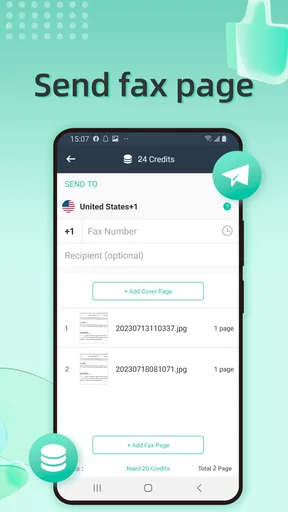
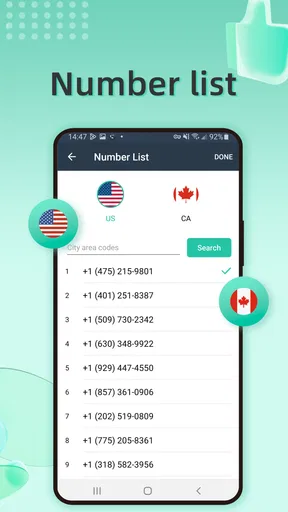
Setting up your first fax is, well, simple. You start by entering the recipient's fax number, which you can type in manually or select from your contacts. A handy feature, especially if you’re like me and can never remember anyone's number!
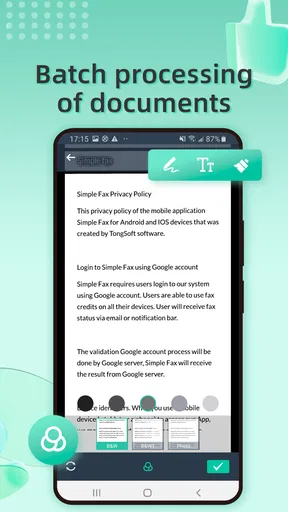
The app accepts various file formats, including PDFs, images, and documents. You can upload files from your device or use the built-in camera to snap a photo of your document. The cropping and editing tools are surprisingly robust, allowing you to tweak the image until it’s just right. Trust me, this is a lifesaver when you're trying to fax a document with sketchy lighting.
Sending and Receiving Faxes
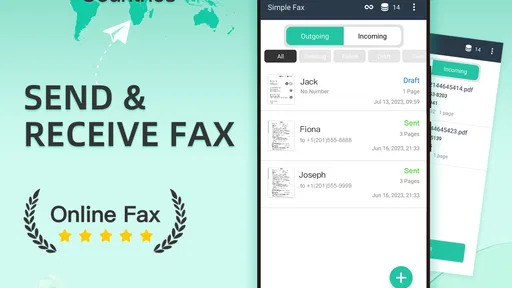
Once your document is ready, hit send, and voilà! The app provides real-time updates on your fax's status, so you’re never left wondering whether it went through. You can also receive faxes directly in the app, which is perfect for those who need to manage multiple documents on the go.
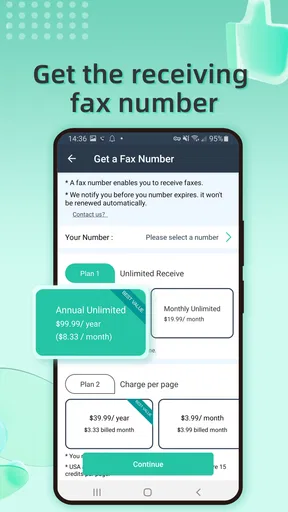
One thing to note is that sending faxes requires credits, which you can purchase within the app. The pricing is fair, and there are various packages to suit different needs. Whether you’re an occasional user or sending faxes regularly, there’s an option that won’t break the bank.
User Experience and Interface
The overall user experience is smooth and intuitive. The app's design is clean, and the navigation is as straightforward as it gets. No need to fumble around trying to find features—they’re all right where you’d expect them to be.
Customer support is also commendable. I had a minor hiccup during the setup process and found their support team to be quick and helpful. It’s always reassuring to know that help is just a message away.
Security and Privacy Concerns
In today’s digital age, security is a top priority, and Simple Fax-Send Fax from Phone doesn’t disappoint. The app promises encrypted transmission of your documents, ensuring your sensitive information stays private. This is crucial, especially if you’re sending confidential documents.
Additionally, the app doesn’t store your faxes indefinitely, which is a plus for those who are privacy-conscious. You have the option to delete your documents after sending, giving you full control over your data.
Final Thoughts
In a world where time is of the essence, having the ability to send and receive faxes from your phone is a game-changer. Simple Fax-Send Fax from Phone delivers on its promise of simplicity and efficiency. Whether you’re a busy professional or someone who just occasionally needs to send a fax, this app is a handy tool to have in your arsenal.
With its user-friendly interface, reliable performance, and fair pricing, it’s no wonder this app has become a favorite among users. So, the next time you find yourself needing to send a fax, give Simple Fax a try—you might just wonder how you ever managed without it!
Pros
- Easy-to-use interface for quick navigation.
- Supports various document formats.
- No fax machine needed
- just your phone.
- Secure transmission with encryption.
- Affordable pricing for frequent users.
Cons
- Limited free trial pages available.
- Requires internet connection to send.
- Occasional delays in fax delivery.
- Ads in free version can be disruptive.
- Some features locked behind paywall.
FAQs for Simple Fax-Send Fax from Phone
What features does Simple Fax offer for sending faxes from my phone?
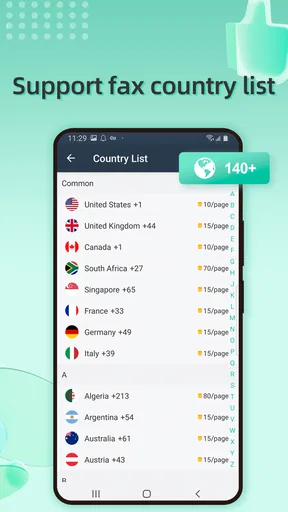
Simple Fax provides a seamless experience for sending faxes directly from your smartphone. The app supports multiple file formats, including PDF and JPEG, and allows you to send documents to both local and international numbers. It features a user-friendly interface, offers fax history tracking, and provides confirmation receipts for successful transmissions.
Is Simple Fax free to use, or are there any in-app purchases?
While Simple Fax is free to download, it operates on a credit-based system for sending faxes. You can purchase credits within the app, which are used to pay for each fax sent. The pricing is competitive, and there are various packages available to suit different needs. Occasionally, the app may offer promotions or discounts.
How secure is the information I send through Simple Fax?
Security is a top priority for Simple Fax. The app employs encryption protocols to protect your documents and personal information during transmission. Additionally, it does not store your faxed documents on its servers, ensuring your data remains private and confidential. This makes it a reliable choice for sensitive communications.
Can I receive faxes using the Simple Fax app?
Currently, Simple Fax focuses solely on sending faxes from your phone. It does not support receiving faxes directly within the app. However, for users who need to receive faxes, it is recommended to use an alternative service or look for apps that offer both sending and receiving capabilities.
Is Simple Fax compatible with both Android and iOS devices?
Yes, Simple Fax is available for both Android and iOS platforms, ensuring broad compatibility across different devices. The app is designed to work seamlessly on smartphones and tablets, providing a consistent and reliable experience regardless of your device type. Regular updates ensure compatibility with the latest operating system versions.


